Background and collaboration scope
Note: This is an external-facing product for SMEs and insurance underwriting/risk teams. The project turns the team’s probabilistic cyber-risk engine into a practical Web assessment workflow. As the lead product developer, I owned the frontend, application service, data and AI integration, security controls, and AWS production release; the team retained ownership of the underlying risk model and domain rules.
Product workflow
The assessment is organised as seven connected stages:
- Automated company profiling: A company website URL starts public-source collection through Jina Reader, producing proposed profile fields with source references.
- Evidence and field verification: The user reviews each extracted field alongside its confidence and supporting evidence, then confirms or corrects it before continuing.
- Conversational gap filling: A guided assistant groups questions by topic and collects information that public evidence cannot supply, converting each answer into a reviewable field.
- Structured form review: A multi-step form brings the collected fields together so the user can edit them, save a draft, resume an incomplete assessment, and review the submission before confirmation.
- Historical incident retrieval and loss estimation: More than 12,000 CyLoss incidents provide comparable cases. Semantic ranking combines incident text with industry, geography, recency, and available loss evidence to inform the loss estimate.
- CRADLE scenario construction: CRADLE accepts conversation, network topology images, PDF, Markdown, and TXT material. Extracted assets, network relationships, and attack context remain traceable to their source.
- JELAS risk analysis and reporting: JELAS analyses the validated scenario and returns an executive summary, system-level findings, and prioritised actions.
The roughly ten-minute target covers stages 1 through 4 and produces the initial company risk profile. CRADLE scenario construction and the complete JELAS risk analysis continue as later stages.
System architecture
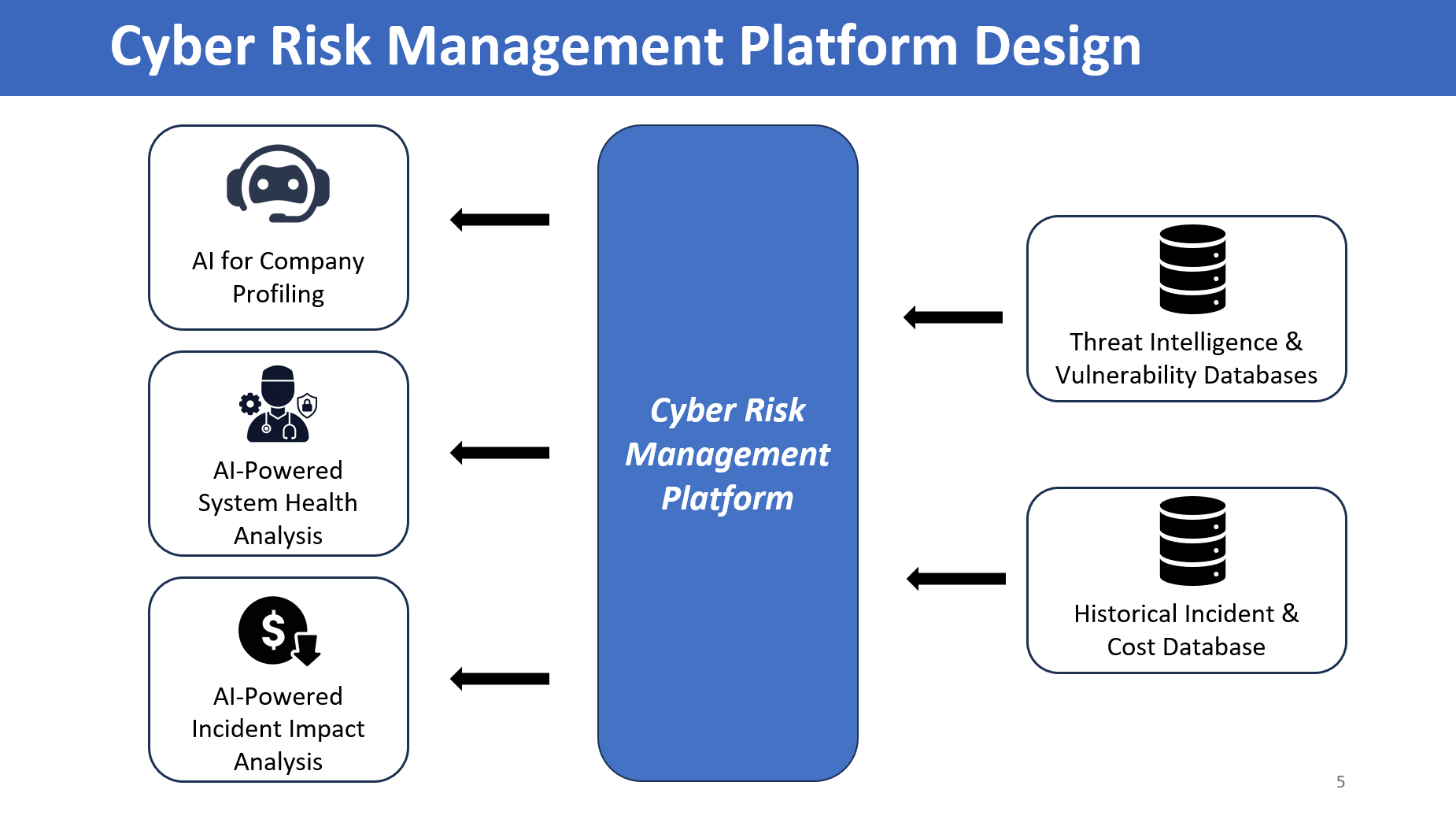
The implementation uses five practical layers. A React client manages the guided experience. Flask provides the application and risk-engine boundary. PostgreSQL and versioned submissions hold production state. AI providers, document extraction, and semantic retrieval handle evidence enrichment. Authentication, application controls, and the AWS release topology govern access and operation.
This is a small-to-medium web product deployed on one AWS Linux host. Nginx terminates HTTPS and proxies to Gunicorn, which runs the Flask application under systemd. SSE and REST-style interactions share the same application boundary, and the team risk engine remains a separately maintained dependency behind that boundary.
Engineering and product delivery
Frontend engineering
- Primary toolchain: React, Vite, and Tailwind CSS provide the maintained interface. Vanilla JavaScript is limited to lightweight interactions and legacy pages that are being migrated progressively.
- Reusable product flows: Shared components cover company profiling, evidence review, assessment chat, incident comparison, scenario capture, and results. Responsive layouts keep the same workflow usable on common laptop and tablet widths.
- Form and draft state: One shared multi-step state model carries values between conversation, verification, and structured review. Client validation gives immediate feedback, while server validation remains authoritative. Versioned drafts make an interrupted assessment resumable.
- Operational UI states: Loading, error, and empty states are defined for extraction, retrieval, and analysis. SSE updates model output and task progress without hiding incomplete or recoverable results.
Flask service and risk-engine integration
- Application boundary: Flask exposes REST-style boundaries for submissions, evidence, and results, with SSE for model output and task progress. Requests are validated before work begins, and recoverable errors use a consistent shape that the client can present and retry.
- Engine adapter: The application translates validated product submissions into the team’s risk-engine input and maps results back to stable presentation models. This boundary keeps workflow state, user-facing errors, and progress reporting in the product layer.
- Source-aware intake: Topology images contribute assets and network relationships. PDF, Markdown, and TXT sources contribute attack context only when supported by the material. Missing values stay unresolved for follow-up.
Data and state management
- Environment-specific storage: PostgreSQL is the AWS production database. SQLite supports local development and lightweight deployment. The same migration path keeps their application schemas aligned.
- Submission lifecycle: Transactional writes preserve versioned company submissions and their evidence references. Draft and publish states separate in-progress user work from records available for team review.
- Incident retrieval: More than 12,000 CyLoss records are ranked using SentenceTransformers embeddings alongside industry, geography, and time signals. An embedding cache is warmed in the background after service startup so the first search does not carry the full model loading cost.
- Traceability: Structured logs record request outcomes, extraction status, and risk-engine handoffs without placing sensitive assessment contents in routine operational messages.
AI model integration and output validation
- Shared provider boundary: OpenAI and Anthropic are selectable providers behind one integration boundary. Provider selection is task-oriented, so structured extraction, conversation, and document interpretation can use the model configured for that job.
- Bounded model calls: Structured outputs are parsed against an expected schema. Timeouts and retries are limited, and an incomplete response is returned as a recoverable state rather than accepted as a finished assessment.
- Reviewable extraction: Jina Reader content and uploaded CRADLE material retain source references. Proposed fields pass schema validation before they enter a submission, while uncertain fields return to conversational follow-up.
- Retrieval and analysis context: CyLoss matches support incident comparison and loss discussion. PyKEEN and NetworkX remain part of the risk-engine integration used to represent and analyse the validated scenario.
Identity, access, and application security
- Controlled accounts: Google OAuth provides sign-in. New accounts require administrator approval, and RBAC separates SME, underwriting, and administrative actions. Brevo sends registration, approval, rejection, and password-reset notifications.
- Session and request protection: Secure session cookies use HttpOnly, SameSite, and HTTPS constraints. Flask-WTF supplies CSRF protection for forms and JSON actions, while Flask-Limiter applies tighter rate limits to costly extraction and model operations.
- External input controls: SSRF validation checks the scheme, resolved destination, and address class before fetching a company website. Upload handling bounds request and decoded sizes, permits supported file types, and reports empty, unreadable, or partial input as recoverable errors.
AWS deployment and operations
- Single-host topology: The production application runs on one AWS Linux host. Nginx and Let’s Encrypt provide the HTTPS entry point, Gunicorn serves Flask, and systemd supervises the process.
- Environment-specific configuration: Secrets and deployment settings are supplied outside the content and code path used for local development. Proxy-aware configuration preserves the correct public HTTPS origin for authentication and account links.
- SSE-aware proxying: Nginx buffering is disabled for event streams, and analysis traffic receives bounded timeouts appropriate to longer requests.
- Release checks: Health checks cover the web process, proxy path, and controlled login surface. Structured logs support diagnosis, and releases use controlled restarts after configuration and migration checks.
Operations and review loop
- Account administration: An administrative view supports approval, rejection, role changes, and account disabling, with an audit record for each action.
- Feedback handling: Users can submit contextual feedback from the product. The team reviews it with the related workflow stage and records the disposition for subsequent releases.
- Review state: Draft submissions remain private to their owner. Published versions become available to authorised reviewers for assessment review and product validation.
Tech stack
| Layer | Tools |
|---|---|
| Frontend | React, Vite, Tailwind CSS, limited vanilla JavaScript |
| Application | Flask, RESTful API boundaries, Server-Sent Events (SSE) |
| Database | PostgreSQL for AWS production, SQLite for local or lightweight use |
| AI providers | OpenAI, Anthropic |
| Retrieval and extraction | SentenceTransformers, CyLoss, Jina Reader, PDF, Markdown, TXT and topology intake |
| Risk integration | PyKEEN, NetworkX |
| Identity and notifications | Authlib, Google OAuth, RBAC, Brevo HTTPS API |
| Application security | Flask-WTF, CSRF, Flask-Limiter, SSRF validation, secure cookies, bounded uploads |
| Production operations | AWS Linux, Nginx, Let’s Encrypt, Gunicorn, systemd |
Production status
The platform is deployed on an AWS Linux host for SMEs and insurance underwriting/risk teams. Nginx and Let’s Encrypt provide the HTTPS entry point. External users access the assessment through controlled accounts, while account approval and RBAC separate SME, underwriting, and administrative permissions. The implementation repository is linked from this page.
Screenshots
Landing — guided workflow, ~10 minute path from URL to an initial risk profile
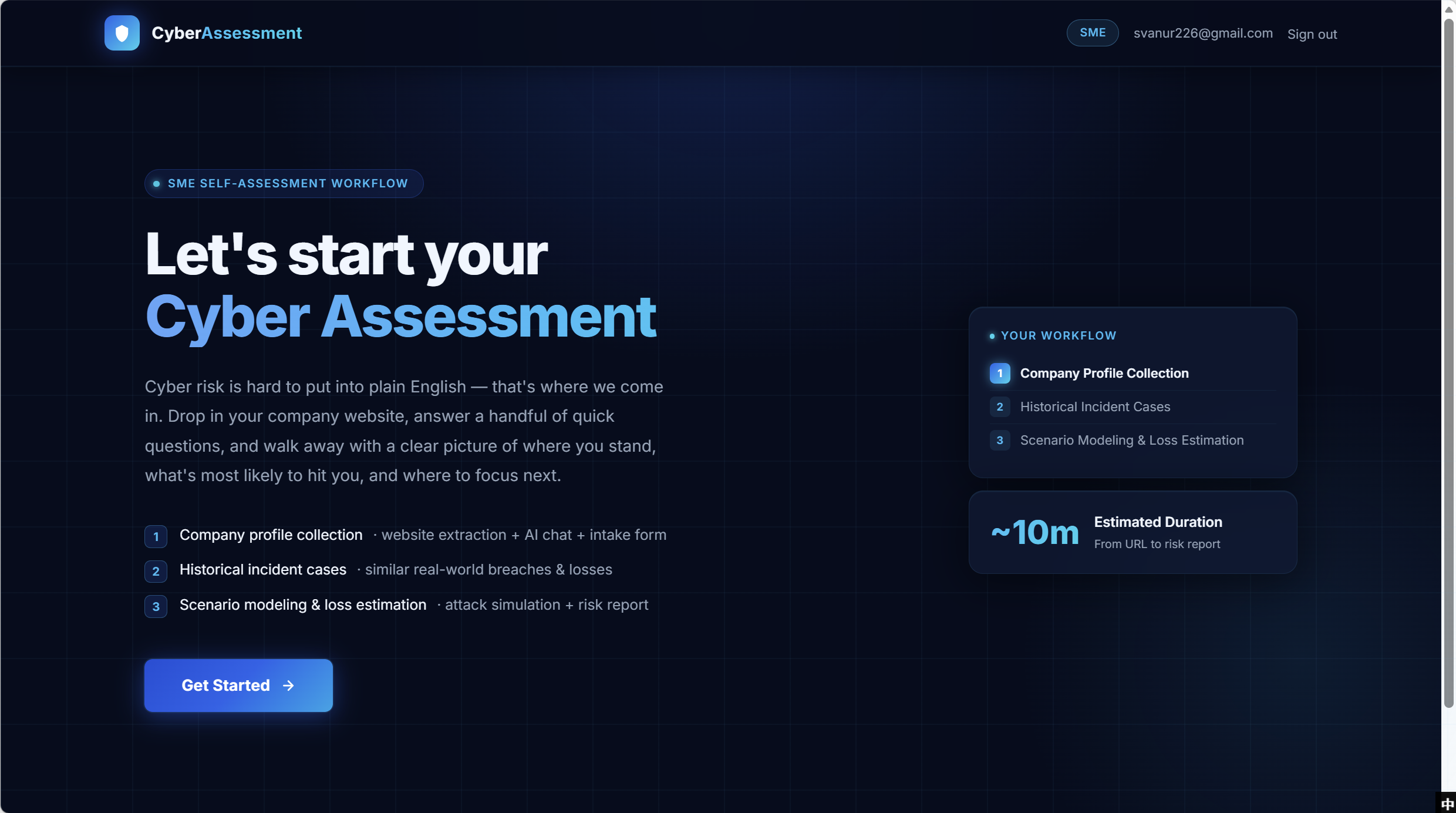
The landing page presents the workflow and its current progress together. The left column lists company profiling, historical incident comparison, and scenario modelling with loss estimation. The Your Workflow panel repeats that order on the right. The ~10m tile applies to the initial company risk profile; CRADLE scenario preparation and the complete JELAS analysis run in later stages. The header badge identifies whether the user is in the SME or Insurance workflow.
Verification — confidence-coded review of auto-extracted fields
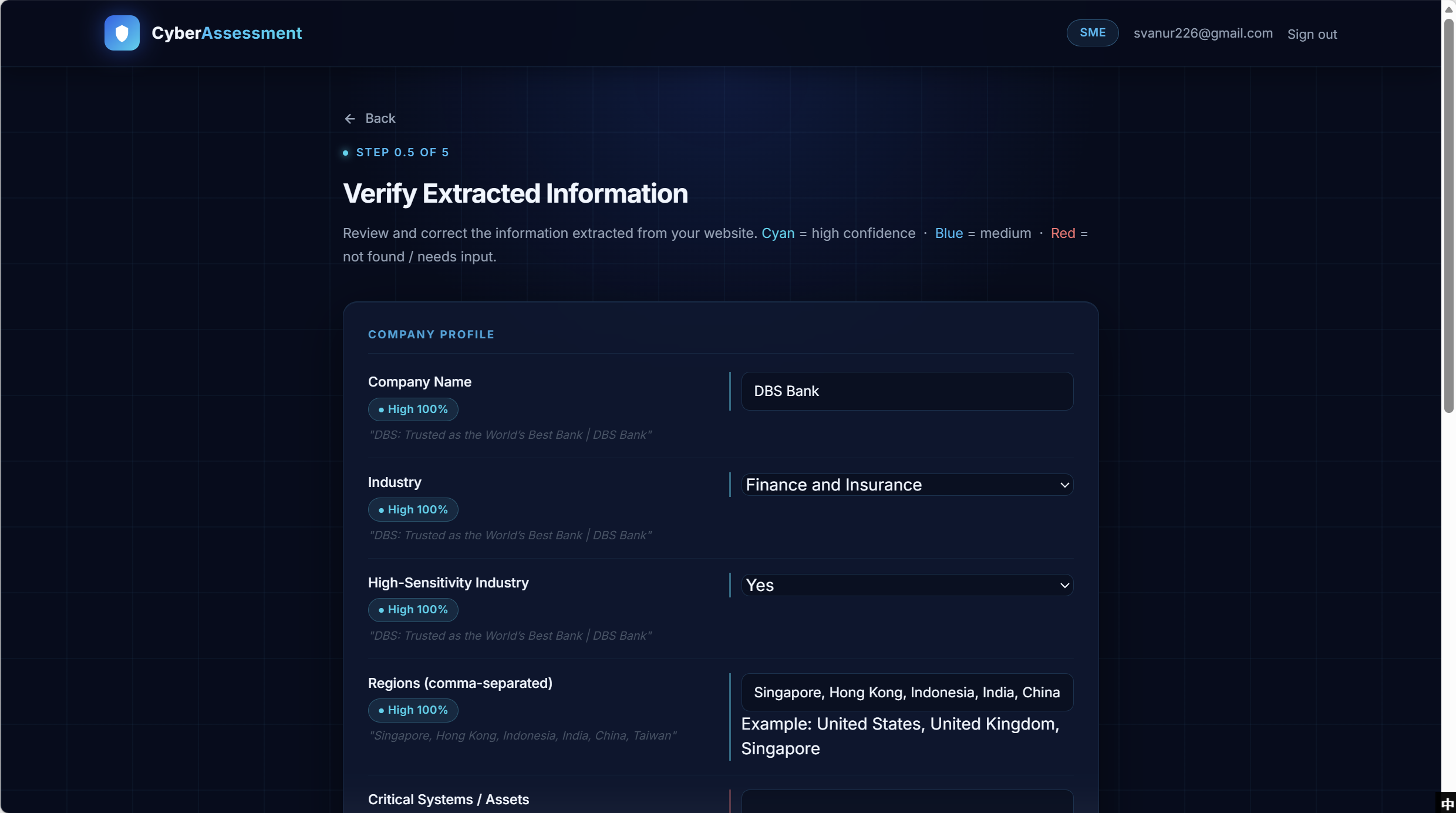
The verification page places each extracted value beside its confidence badge and source excerpt. Users can prioritise fields marked as uncertain or missing while retaining the option to review every value before continuing.
Assessment Chat — conversational gap-filling with a live collected-fields panel
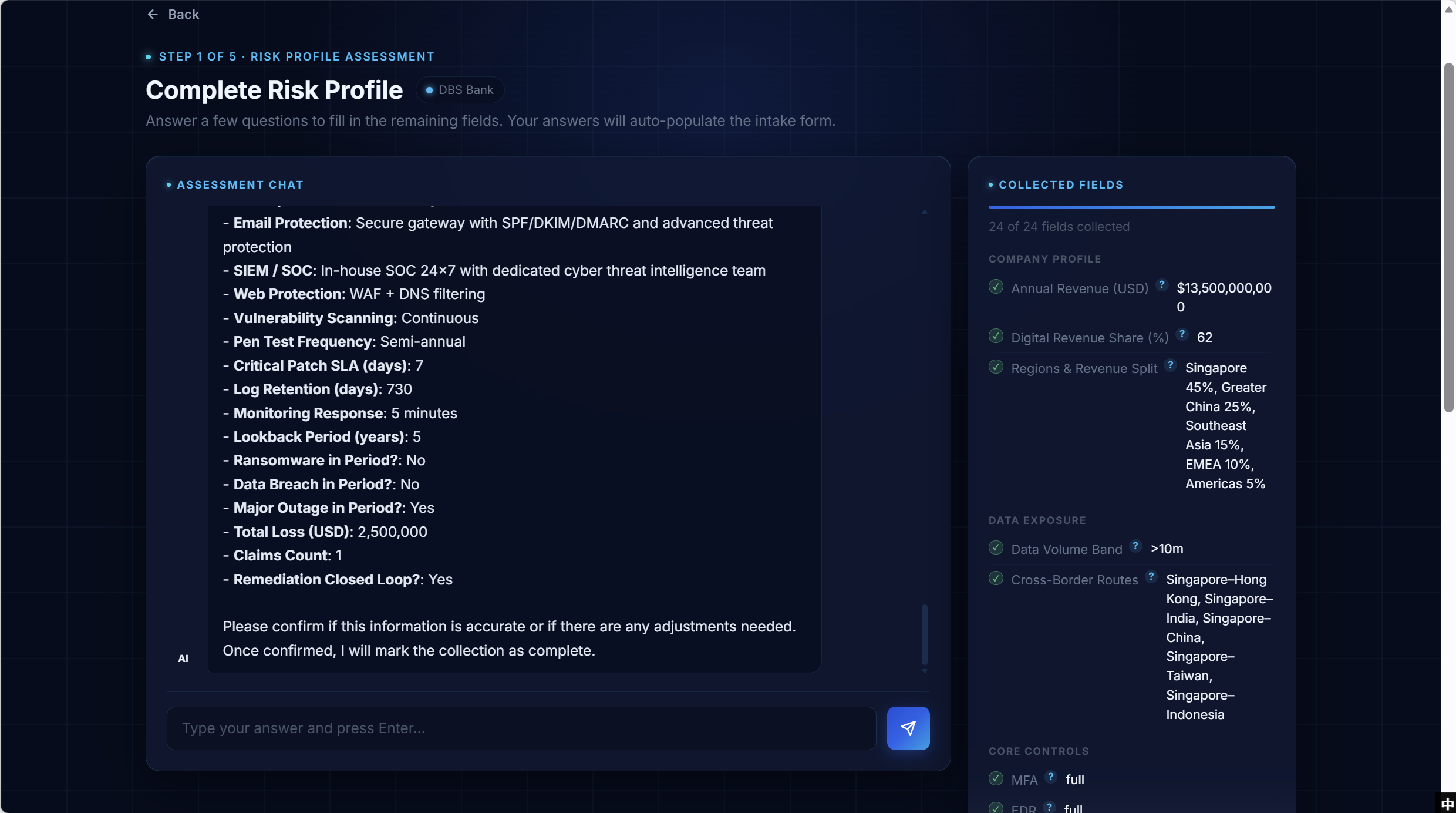
The conversational assistant groups more than 22 fields that are unavailable from the public website. After each reply is parsed, the Collected Fields panel updates the field states and values. The user can review captured information and supply missing details before final confirmation.
Historical Incidents — relevant past breaches for benchmarking
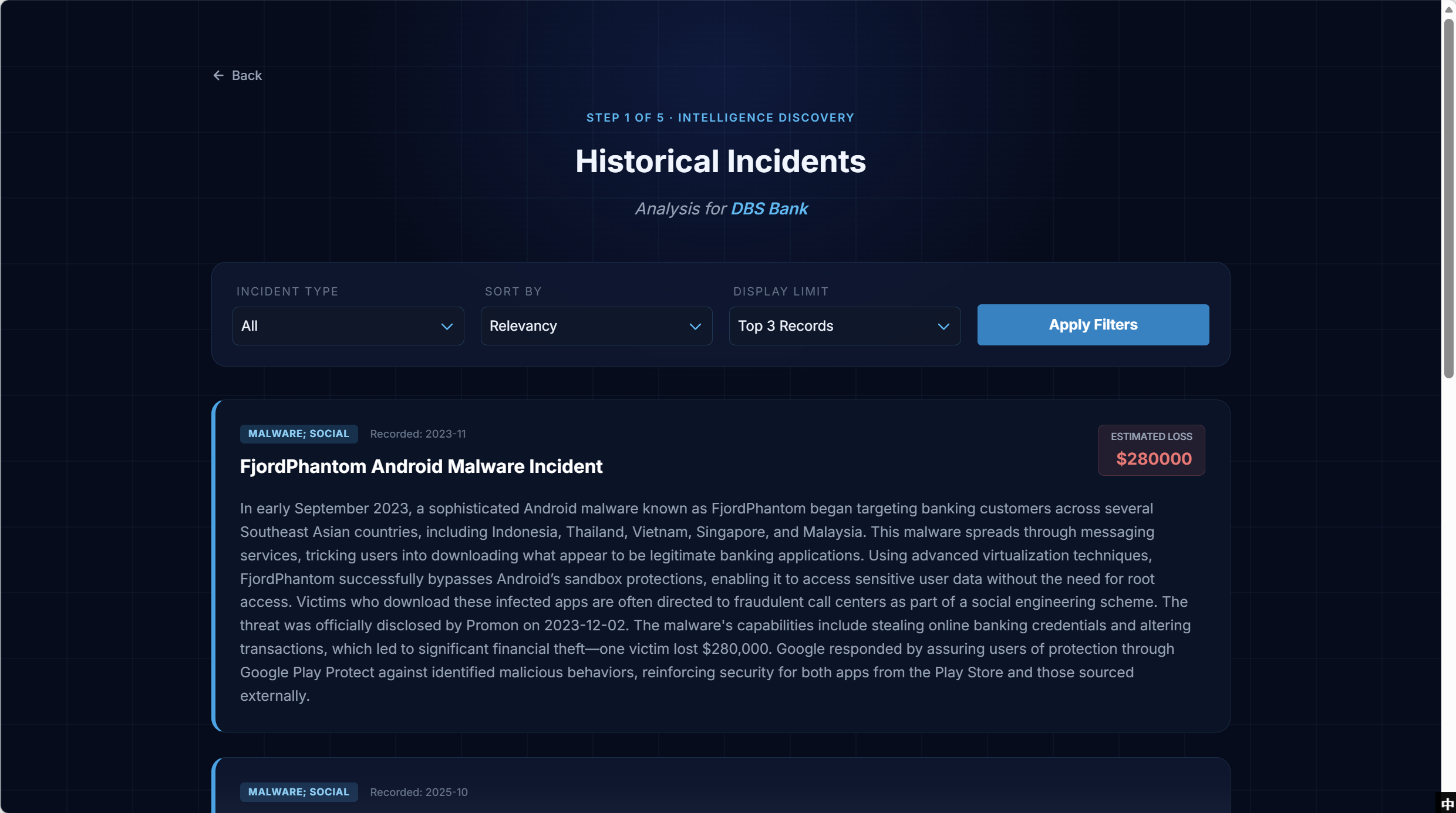
Each incident card includes the event type, recorded date, estimated loss, and historical context. The candidate pool is filtered by industry and geography, then ranked using semantic similarity, date, and available loss evidence. An underwriter can refine the results by incident type, relevance, date, or loss magnitude.
Risk Analysis Result — executive summary, tier distribution, system health
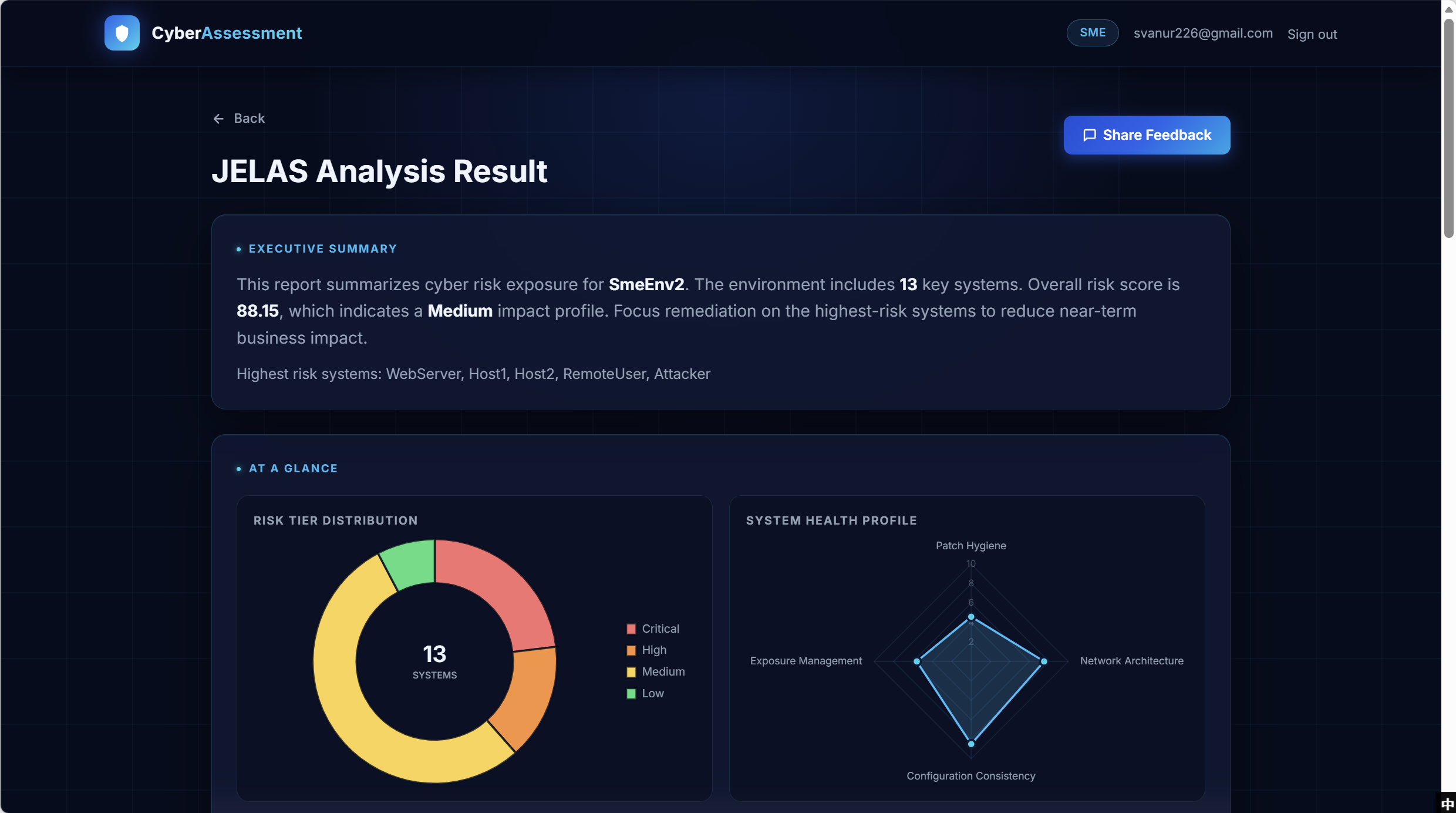
The result page begins with an Executive Summary containing the overall score, impact tier, and highest-risk systems. The Risk Tier Distribution doughnut and System Health radar present the tier distribution and four health measures before the user opens system-level findings. The Share Feedback button records feedback associated with the current result.